
“…on pimping your browser” – The Guardian headline
Stephen Fry shows you how to enhance your browsing experience with a few simple alterations to your set-up. Technical types are free to look away and snort gently. Go on, take Firefox for a test drive.
Dork Talk will devote itself over the next two weeks to those of you who regularly browse the web but don’t consider yourselves in any way expert at techy, dweeby, geeky things. I want to show you how to enhance your browsing experience with a few simple alterations to your set-up. They don’t involve any kind of specialist knowledge and they are all reversible.

Technical types can look away and snort gently: this is aimed at – well, I have many friends who can, so to speak, drive around the web, but who have never thought much about the software vehicle taking them through the traffic.
The conveyance in question, the application you use for visiting websites, is called a browser. Internet Explorer (IE) and Safari are the browsers that come bundled with Windows and the Mac Operating System respectively. I’m going to suggest you say goodbye to them and try running around with Firefox for a while. IE is pants, pure and simple. Safari is clean, elegant and fast (and now comes in a superb Windows implementation), but Firefox has one advantage: customisability. It is an Open Source application, which means anyone can programme for it, producing free, publicly accessible enhancements and add-ons that improve power, flexibility, function, speed and appearance.
Download the latest version of Firefox from mozilla.com and fire it up. Don’t delete your old browser, especially if you’re a Windows user: Microsoft, with signature bullying arrogance and clumsiness, insists on IE’s use for certain plodding system update procedures, bleugh! Those aside, you are going to be using nothing but Firefox for two weeks in an I-guarantee-you’ll-change-your-margarine-for-good type test, so the first thing you should do is click Tools-Options (Firefox-Preferences on a Mac) and select the option in the Main tab that allows the app to check to see if it is the “default browser”: this is important because it means whenever you click a weblink in an email or document, that page will now automatically open in Firefox.
The next thing I would recommend is to use Tabs to create a home page of four or five favourite sites. From a blank single page you enter “news.bbc.co.uk” (or your chosen equivalent), then click “Control-Tab” and in the new page enter, say, “pro.imdb.com”, repeating this procedure until all the sites are entered, each in a new tab. Next go to Tools-Options and select Use Current Pages from the Startup section of the Main tab. Note the plural. This is now something all major browsers allow you to do – have multiple sites tabbed inside your opening home page.
You may notice that the tools menu also contains the option Add-ons, identified by a jigsaw puzzle piece. There are thousands of add-ons for Firefox: if you want to see how insanely you can personalise, see below…
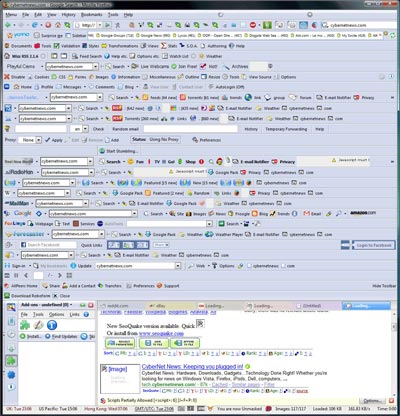
Don’t be afraid to be just as silly when you get started with modifying your workspace – you can always rein back your excesses, but the experience of throwing in everything is the best way to find out a great deal about the process without it seeming like a learning curve. The heuristic approach, innit
Add-ons are divided into two types, Extensions, which we’ll look at next week, and Themes. Themes are essentially “skins” or cosmetic makeovers that present the browser and its main features in new colourways, fonts and stylings. It may seem superficial to spend time on the appearance of your browser, but bear with me, I think you’ll enjoy yourself.
So select Tools-Add-ons and click on the Themes artist’s palette icon: you will see that Firefox Default is your only installed theme, but that there is a Get Themes link in the bottom right-hand corner. Click it and you find yourself directed to a gallery where hundreds and hundreds of different designs await you. Personally I like Frank Lion’s “Aluminium Kai” and “Mostly Crystal” by CatThief, but you’ll soon find your own favourites. All you have to do is click, install and restart Firefox to admire the effect. Play with as many themes as you like; you’ll see how easy it is to uninstall them. Next week we go beneath the skin…
© Stephen Fry 2007


I do love the Greasemonkey extension. Anything that can aid in getting rid of those annoying ads on various sites is good enough for me.
That image is both hilarious and frightening at the same time. I’d be worried if anyone’s Mozilla browser even remotely resembled that.
My favourite thing about Firefox is that if you click on a link with the wheel of your mouse, it automatically opens it in a new tab. If you’re using an RSS feed like Google Reader, or if you’re looking at a list of articles on a news site or something, you can just work your way down them, opening the ones you want in a row, and even if they’re pages that take a while to download the later links can load while you’re reading the first few.
A feature I love yet seems rarely mentioned even by experienced Firefox users is the ability to have multiple profiles so you can, for example, have various differently configured profiles for different tasks.
Some info;
http://randomtweaks.blogspot.com/2006/11/managing-profiles-in-firefox.html
I love the fact that I can be so completely computer illiterate yet I can still manage to find my way around the ever-delightful Firefox. Hurrah for the internet browser that caters to tech-dummies!
I was devoted to Firefox once, particularly as a Windows user. (Since then, I have used Ubuntu for a few months and OSX permanently since I got my iMac just over a year ago (although I started using OSX properly 18 months ago on purchase of a MacBook).
Earlier this year, though, I discovered the beauty of Opera on OSX. Admittedly, I never customised Fx very much, but that meant that all the things I added and had to constantly update there were built right into Opera, needing only the updates the browser itself required and meaning no waiting for the apps to be updated after the browser updated: ad blocking, scripts and (before Fx built it in) spell checking. I also find the positioning of the tabs bar in Opera (above the address bar) makes far more sense than in other browsers. Oh, and Speed Dial. I adore Speed Dial.
I was devoted to Firefox once, particularly as a Windows user. (Since then, I have used Ubuntu for a few months and OSX permanently since I got my iMac just over a year ago (although I started using OSX properly 18 months ago on purchase of a MacBook).
Earlier this year, though, I discovered the beauty of Opera on OSX. Admittedly, I never customised Fx very much, but that meant that all the things I added and had to constantly update there were built right into Opera, needing only the updates the browser itself required and meaning no waiting for the apps to be updated after the browser updated: ad blocking, scripts and (before Fx built it in) spell checking. I also find the positioning of the tabs bar in Opera (above the address bar) makes far more sense than in other browsers. Oh, and Speed Dial. I adore Speed Dial.
Safari is usable, but aesthetically horrible, imo. I really despise brushed metal, though.
That would be your screenshot, ‘Melchy’?
Amazing. What a greasy monkey you be. Lovely blog, Mr. Fry.
Thank you for the advice, Stephen!! I loved Firefox on the PC at home, and I’ll definitely look into putting it on my Mac here at school. I wasn’t sure if it performed better than Safari, but if you recommend it, it must be good!
If you’re on a Mac you should check out Camino; it has all the power of Moz/ff and all the style of OSX’s Aqua/Cocoa interface.
Aha! Fight the good fight; open source programming for all! (Also, check out Songbird if one’s looking for a mediaplayer on the rise.)
As I’ve been systematically attempting to convert people to Firefox for years now (directly after my switcheroo), this warmed my very heart.
Save Session and Adblock have been my heroes so many times.
A few suggestions:
Adblock plus
I have used Firefox for years and get into quite a strop if I am forced to use another browser on someone else’s computer because they won’t let me convert them to Firefox. As someone who loves to fiddle and tinker this browser is simply delightful.
Mr. Fry if that is your screenshot, goodness gracious me I bow and I’m not worthy… honestly
I have been using Firefox for a few years now, it has been unloaded on me by my brother (he was mumbling something under breath how useless IE actually is)… so I have switched and have not looked back ever since… I will check out your recommendations I have not done much with it at all, so thanks for the tips
I am definitely in the target audience of the this column. I actually have Firefox loaded on my computer but have never used it and assumed it would be the same as Internet Explorer or Safari, both of which I have used. I will certainly give it a try after reading this.
Oh, come now. I’m a “techie type” and I think it’s a fine topic to blog about. Hey, I might learn something. I didn’t know about the mouse wheel click thing in jonecc’s comment (thanks, jonecc!). I was right-clicking and selecting ‘Open Link in New Tab’ so now I can save a step, dozens of times a day.
I make my living in software, but that doesn’t make me an expert user of everything, not by a long shot. Having to use Office apps is always a pain for me, when I have to write documentation or something.
Incidentally, I’m on a Windows machine using Firefox, and for me, it’s Control-T to create a new tab, then Control-Tab will move between tabs (from left to right – Control-Shift-Tab goes right to left).
Programme? Oh dear. I assumed this was just a silly subeditor at the Guardian, but it’s here as well. Call me a pedant, but the superfluous “me” was a bad idea in the first place, and this kind of fancy Frenchification has no place in Dorkdom.
———————————————————–
From Pam Peters in: The Cambridge Australian English Style Guide.
Quote:
Program is the standard spelling in the USA, and the one adopted in Australia by the Australian Government Style Manual and the Macquarie Dictionary (1991) for all uses of the word. In Britain program is reserved by many for computer uses, and programme applied in all other contexts. This distinction is also made by some Australians, certain influential educational institutions, and parts of the ABC. In the Australian ACE database there are close to 175 instances of noncomputer use of program compared to 60 of programme.
In fact program was endorsed by the original Oxford Dictionary on two grounds:
1. It was the earlier spelling, used in the word’s first recorded appearances in (Scottish) English in the seventeenth century, while the spelling programme makes it[s] appearance in the nineteenth century. (We may speculate on whether it was motivated by the desire to ‘improve’ the Scots or simply an example of ‘frenchification’) …
2. It is analogous with anagram, diagram, histogram, radiogram, telegram, etc., while there are no analogies for programme. (p 613)
———————————————————–
While I’m here: what’s wrong with Lynx?
[...] das gehört nicht hierher. Stephen Fry zeigt in seiner Anleitung für Immer-noch-IE-Nutzer, wie schön man sich seinen Feuerfuchs [...]
I didn’t know the mousewheel click trick either – I use the ‘Drag de go’ plug-in.
I also didn’t know about multiple tabs for the homepage: it’s tempting, but as all my first stop sites need log ins I think I’ll stick to the blank option.
I have to use IE6 at work, having moved to from a small company where I had total autonomy over what programmes to use, and I find the lack of tabs frustrating. When I started, I spent several months learning that the near-instinctive CTRL+T doesn’t work under IE6.
Stumble Upon is one of my favourite add-ons, no matter how much time it wastes! I also like that you can put buttons to websites on a bar in firefox, and easily move them around.
I know it isn’t an official add-on to Firefox, but del.icio.us is the most amazing widget I’ve ever come across–it lets you store your bookmarks on the web using not folder but keywords, as well as letting you search through them with an enging, which makes finding them much easier after you post them. There are little shortcut buttons you can put on that useful firefox bookmark toolbar too! I have no idea how I lived without it.
O! And the gmail add-on is amazing, as well as all the languages one can install in the firefox spellchecker (I now have Welsh, French, Arabic and British English–no more will firefox say ‘colour’ and ‘Englyn’ are spelled wrong! ^_^). Finally, the very-useful, sometimes-scary National Novel-Writing Month add-on for wordcount hangs out next to my gmail widget on the bottom toolbar.
I am a “techie-type” too, as ysabella. I concur that this is a pragmatic debate and one that I have been a part of many time before. I have used Firefox, but I always come back to Safari, solely for the integration within OSX. I have .Mac, so syncing all my bookmarks and RRS feeds across my 3 Macs is a doddle – the same goes for my iPhone. Were I to use Firefox as a main browser, I would gain in some areas but lose in others.
I wonder how you keep in ’sync’ with your iPhone and Firefox? You must surely use Safari? No?
OK, I found a solution! As ‘they’ say; “Google is your friend”…
http://www.everydaysoftware.net/
I personally like using dark themes, but the funniest I have seen is “Bible Fox”.
https://addons.mozilla.org/en-US/firefox/addon/4516
Priestly pimping anyone?
@xugglybug: you can use UNO (http://gui.interacto.net/) to remove the brushed metal look from safari and any other application (if you are running OS X that is)
I wouldn’t be so partisan on the “Microsoft, with signature bullying arrogance and clumsiness, insists on IE’s use for certain plodding system update procedures”. For Microsoft to deliver on the update procedures it needs to have a channel it can rely on. As much as I love Firefox and I have used it as my main browser for years, it has gone through about 5 updates itself in recent weeks, presumably to rectify security issues, and has the worst memory management of any browser, rapidly chewing through 400MB-1GB of RAM. It’s also become annoying unresponsive in recent iterations when a tabbed page has Flash content.
Furthermore, Apple has a much stronger bullying “signature” with respect to hardware partners, its closed music ecosystem and the cavalier way it installs unwanted software components on a Windows system once Quicktime or iTunes get an entry.
Firefox’s open source heritage does not preclude anyone from writing add-ons for other browsers.
Please Stephen, less info-tabloid-level snarkiness, I know you are capable of greater subtlety and equanimity than you display here.
I love Aluminum Kai!
The thing I don’t like about Firefox is that it doesn’t seem to like the Flash games I like. I like games, so there…(^^). I have no issues when playing Neopets games, but when I try playing games in Yahoo! and Nickelodeon, I can’t do shit using Firefox. I have to do my playing on IE for that, which bites. I’ve become so used to Firefox since one of my brothers introduced me to it a few years back.
Wow–my comment made me sound like a whiny teenager. Ack! Sorry about that–asthma made a return and I don’t think I’m getting enough oxygen into my brain. Or it could be the medication I’m taking for it. LOL
I concur. I’ve used just about all the browsers out there and Firefox is the most useful on a day-to-day basis, with its built-in dictionary/spell checker that highlights your mistkaes.
That hyper-personalized browser looks like it had spent its summer hols as a love-slave to a horde of adware.
Opera does everything Firefox does that I find useful (though there is less customization), and much more. For example, there’s the e-mail client, as well as lots of things you can do with simple mouse gestures.
Thankyou Mr. Fry!
I’m a new Firefox user (I’ve always known it was way better than IE, but for inexplicable reasons my computer insisted in treating it like crap, with the predictable consequences) and I’ve found your article quite inspiring
I love that apparently useless details like being able to change the skin of some program. I’m testing it just in a second!
I’ve been using Firefox for longer than I can actually remember (2 or 3 years? Quite a while anyway) and I heartily concur – it is a magnificent browser.
Aww poor browser. It looks worn down. *pets*
I’ve been rather smugly (and evangelically) using Firefox for a year or two but never knew you could have multiple tabs as a home page – so at a stroke, you’ve made my life even better. Genius. But your screenshot’s given me a blinding headache. Get organised, man.
There’s something I dislike a lot about Firefox. It annoys me that it definitely is the best browser out there, feature-wise. Personally, I couldn’t do my job on a day-to-day basis without Firebug, Greasemonkey, the del.icio.us plugin, 1passwd and aronnax’s awesome themes for Firefox mac. Havin sung Firefox’s praises now, I can get onto the little things that grate on me about it – like the latest version’s inability to use secured login popups, or its memory leakage, or its not being as beautiful as Safari. You also really have to be so careful which extensions you install – and I mean REALLY careful. When I started using Firefox about 4 years ago, I went a little crazy on the extensions front (as Stephen appears to have) and there are some that can bring the poor little fox to its knees.
I would say that there’s only really 1 need for Firefox – that is if you NEED the extensibility that it offers (that, or your other alternative is I(nternet)E(xplorer)). If you don’t, then stay with Safari on OSX, or have a look at Opera in Windows – they’re less feature-rich and, therefore, potentially confusing than Firefox and they will use less resources.
Whilst IE7 has come on in leaps and bounds in comparison to its predecessors, as far as standards compliance goes it’s not even close to Firefox, Safari or Opera. Pardon my Fry-like condescension, but if you want a better browsing experience, avoid any incarnation of Internet Explorer like it just caught you in bed with its mother. On top of the better browsing experience, you can feel comfortable knowing that every IE-ditcher makes a web developer’s life slightly easier!
I’m really surprised that you didn’t suggest the Google Homepage (www.google.com/ig) for users who are new to FireFox… I think it’s a much more user friendly way of getting all your content when you open your browser, on one page rather than in separate tabs.
Upon reading this article today in the Guardian, I followed your advice and finally installed Firefox. So far, I can report that it was a brilliant decision! Although I am slightly concerned that I’ll end up wasting more time online now, rather than actually saving it as I’d hoped: I spent far too long messing around with themes. I eventually settled for for “Cylence: sapphire variation” – but I can quickly see this becoming a new form of procrastination, which with exams looming, I could probably do without. It appears to serve as the internet’s primary use for me at the moment; I even managed to get ahead of myself and progress to Extensions! Although I have nowhere near the amount demonstrated in the screenshot you provided: please say that’s not your computer!
As a side note: I’ve been reading your blessays for a while, Mr Fry, and would like to say how very much I look forward to each new installment. I’ve been a bit intimidated to comment before now (your other commenters write far more articulately!) but having only recently read Moab Is My Washpot (which, as a seventeen year old, I found particularly moving and pertinent), it’s so lovely to be able to continue to hear your thoughts and wisdom!
Another big hooray for Firefox. Tab browsing has been one of the biggest steps forward in my browser experience. I first used tab browsing in Safari, although I prefer Firefox these days.
Why? Well, largely because of the plug-ins. There is a lot of discussion around the Internet about plug ins, but my essential plug-ins are 1) Ad Block Plus (blocks banner, etc. ads), 2) Foxmarks Bookmarks Synchronizer (my bookmarks at work and at home are always the same! Even between OSX and Windows!), 3) Customize Google (optional…again, ad blocking, always use SSL for e-mail, provide links to the same search in other browsers).
I’m also hugely fond of the built in search (and downloadable search engine…ie CNET, IMDB, eBay) and the right click search is phenominal.
Now on a side note, I do not condone pimping. I would prefer that we refer, respectfully, to utilizing Firefox as gussying up our browsers rather than pimping our browsers!
Oh wonderful! I have nevert looked back since I started using Firefox about 6 months ago. So I read your latest Blog Stephen, with delight whilst nodding and smiling and also with a degree of smugness too. Thank you for the great suggestions. I expect I shall regularly try out differing themes and I am currently enjoying the rather animated hawaiian theme. Oh happy day!
I’ve been using Firefox since sometime in the 90s, and I didn’t know about multiple tabs as a homepage. Great idea … though you’d need a fast connection.
You have, by the way, dear Stephen, had the worst effect on me. I’ve spent the morning splashing around with new themes. I’ve settled on aluminum kai. Beautiful! (Talk about wasting time. And yet, I feel a gurgle of pleasure every time I see my gorgeous new theme. So maybe not.)
Btw, for those of you worrying about Stephen’s sanity in re extensions, that was a page some geek set up as a joke, to show what happens to people with more screen space than sense.
And, yes, Firefox leaks like a CIA staffer trying to avoid blame for Bush’s next war. Those in the know say that is fixed — really! — in Firefox 3. (It’ll take more than an upgrade to fix the CIA.)
Oh, and also, I’d like to second davidbenavram. Pimps are human slavers of the worst sort. The whole idea of using the term to mean nothing but “overdecorated” bothers me everywhere, not just here.
I’ve been using Firefox for years now, but it had a wee bit of a wobble during the last update (my machine gave me a BSOD in the middle of installing) and hasn’t worked since. So rather than go back to Internet Exploder, I thought I’d try out Opera instead.
And lo! It is good! Possibly not as good as Firefox, but it’s got some nice features. I particularly like the customisable dashboard that appears when you close all the tabs, giving you quick-links to your nine favourite sites.
Yeah adblock plus is a definite and also try the download bar. makes life a lot easier.
My favourite thing in firefox though is that just typing in something similar to the website in the URL bar normally gets you to the site you want. Love it.
Anyway great blog!
Oh browser polygamy! What fun…
I do step into Firefox/Minefield/Gran Paradiso every now and then (as I do with Opera), but always migrate back to running Webkit nightlies as my main with Camino there if I need a wysiwyg editor or “math” to work. If only the development of Shiira 2 was up to speed.
Here is the latest installment of Stephen Fry Appreciation Monday, blasted wordpress has been acting up…
anyhow, it is about QI and epiphany on how I am blond after all
http://www.couchslobs.com/?p=121
Haha yes, when I first stumbled across the term ‘pimping’ in cyberspace I was both startled and bemused. Whats wrong with ‘customize?’ It sounds much better, plus I can imagine the look I would get from family and friends when I say I have been pimping my stuff on the internet. They will think I’m in an entirely different sort of biz! ;¬)
[...] see a certain Mr Stephen Fry is pimping Firefox in his latest blog entry, nice one [...]
I hardly dare to ignore the advice of Dan Le Sac vs Scroobius Pip and question Stephen Fry, but I cannot bear to see the word programme used in relation to software development.
Firefox is a program, not a programme. QI on the other hand is a programme not a program.
I fear that too much exposure to Americans who’s lax attitude to lexicography legitimizes (sic) this error is having a deleterious effect on our national treasure!
Stephen, I use IE, and it works perfectly and I love it. Why are you such a Firefox snob? All my friends seem to be as well (Jon, Dan, Ben, etc etc etc). It’s grossly bullying. IE does every thing I want it to do. America has sent you nutnut.
Yours,
Dan.
Been using Firefox for some time now; much better than IE for viewing graphics on various sites.
If you’re into social networking/Social Media I can recommend a FireFox derivative called Flock.
give it a go… http://www.flock.com/