“…on pimping your browser”

Column published on Saturday December 8th 2007 in The Guardian
“…on pimping your browser” – The Guardian headline

Stephen Fry shows you how to enhance your browsing experience with a few simple alterations to your set-up. Technical types are free to look away and snort gently. Go on, take Firefox for a test drive.

Dork Talk will devote itself over the next two weeks to those of you who regularly browse the web but don’t consider yourselves in any way expert at techy, dweeby, geeky things. I want to show you how to enhance your browsing experience with a few simple alterations to your set-up. They don’t involve any kind of specialist knowledge and they are all reversible.

firefox2.jpg

Technical types can look away and snort gently: this is aimed at – well, I have many friends who can, so to speak, drive around the web, but who have never thought much about the software vehicle taking them through the traffic.

The conveyance in question, the application you use for visiting websites, is called a browser. Internet Explorer (IE) and Safari are the browsers that come bundled with Windows and the Mac Operating System respectively. I’m going to suggest you say goodbye to them and try running around with Firefox for a while. IE is pants, pure and simple. Safari is clean, elegant and fast (and now comes in a superb Windows implementation), but Firefox has one advantage: customisability. It is an Open Source application, which means anyone can programme for it, producing free, publicly accessible enhancements and add-ons that improve power, flexibility, function, speed and appearance.

Download the latest version of Firefox from mozilla.com and fire it up. Don’t delete your old browser, especially if you’re a Windows user: Microsoft, with signature bullying arrogance and clumsiness, insists on IE’s use for certain plodding system update procedures, bleugh! Those aside, you are going to be using nothing but Firefox for two weeks in an I-guarantee-you’ll-change-your-margarine-for-good type test, so the first thing you should do is click Tools-Options (Firefox-Preferences on a Mac) and select the option in the Main tab that allows the app to check to see if it is the “default browser”: this is important because it means whenever you click a weblink in an email or document, that page will now automatically open in Firefox.

The next thing I would recommend is to use Tabs to create a home page of four or five favourite sites. From a blank single page you enter “news.bbc.co.uk” (or your chosen equivalent), then click “Control-Tab” and in the new page enter, say, “pro.imdb.com”, repeating this procedure until all the sites are entered, each in a new tab. Next go to Tools-Options and select Use Current Pages from the Startup section of the Main tab. Note the plural. This is now something all major browsers allow you to do – have multiple sites tabbed inside your opening home page.

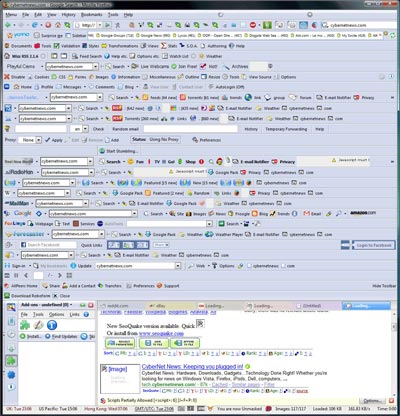
You may notice that the tools menu also contains the option Add-ons, identified by a jigsaw puzzle piece. There are thousands of add-ons for Firefox: if you want to see how insanely you can personalise, see below…
FF_fullscreen_large.jpg

Don’t be afraid to be just as silly when you get started with modifying your workspace – you can always rein back your excesses, but the experience of throwing in everything is the best way to find out a great deal about the process without it seeming like a learning curve. The heuristic approach, innit

Add-ons are divided into two types, Extensions, which we’ll look at next week, and Themes. Themes are essentially “skins” or cosmetic makeovers that present the browser and its main features in new colourways, fonts and stylings. It may seem superficial to spend time on the appearance of your browser, but bear with me, I think you’ll enjoy yourself.

So select Tools-Add-ons and click on the Themes artist’s palette icon: you will see that Firefox Default is your only installed theme, but that there is a Get Themes link in the bottom right-hand corner. Click it and you find yourself directed to a gallery where hundreds and hundreds of different designs await you. Personally I like Frank Lion’s “Aluminium Kai” and “Mostly Crystal” by CatThief, but you’ll soon find your own favourites. All you have to do is click, install and restart Firefox to admire the effect. Play with as many themes as you like; you’ll see how easy it is to uninstall them. Next week we go beneath the skin…

© Stephen Fry 2007

This blog was posted in Guardian column

85 comments on ““…on pimping your browser””

  1. WambaughWambaugh says:

    No love for the Opera browser? Its great, very quick, very customizable and it doesn’t eat up my memory like The Fox does.

    It’d be interesting to see what percentage of your visitors use which browsers, maybe a blog post detailing the stats.

  2. WambaughWambaugh says:

    I must add I don’t myself use Internet Explorer, especially the new 7th version … some like the new version but Microsoft’s tabbing idea and new menu is madness to me.

    I do have to use Internet Explorer sometimes though, for the Beeb’s iPlayer with which I download Q.I.

  3. BruceR says:

    My favorite Add-ons are Greasemonkey and Platypus which makes Greasemonkey easy and NoScript which kills scripting from a page before you are sure about what it is trying to do. And I’ve just realised that my Firefox Add-Ons list makes me look like a paranoid control freak.

    Of course there are also add-ons for IE7. My pick is IE7Pro.

  4. shov says:

    I used to love Firefox (on Mac OS X), it’s the only browser where I can set up tabs to behave as I want and block flash adverts in the way I want. However, during a RAM shortage a few months ago, I found it a bit resource hungry, so I switched to Opera, then Camino and currently Safari 3 – which drives me mad; it keeps crashing and inconsistently opens links in new tabs or windows. (An aside: liike xugglybug, I also despise brushed metal but have managed to banish it from Tiger with Uno. I further despise the recessed looking typeface Apple uses for the tabs in Safari; it looks like newsprint that where the two plates haven’t correctly aligned).
    What I’m waiting for is either Shiira (surely the most beautiful browser) to become stable and gain a decent adblock, or for Firefox 3; however, I tried the beta the other day and it doesn’t mesh too well with Uno…
    Will there ever be a time when I can use just one browser on the Mac? Luckily with an option + Apple + F (or S or C) I can open my current webpage in Firefox (or Safari or Camino). Dare you to write a piece in the Guardian on Quicksilver!

  5. Stooshie says:

    Brilliant Blog. Lets hope this increases the share of the browser market somewhat.

    Duly submitted to Slashdot. Lets hope it gets to the front page. :-)

  6. Sheumais says:

    If you wish to avoid Google building a profile of you, based upon your various searches, then it is worth visiting http://www.customizegoogle.com/

    Here you can set the privacy function to avoid a profile being compiled. Once set-up, click on tools, CustomizeGoogle Options and Privacy.

    It is also handy to open your web browser in a sandbox, to enhance your PC’s security. Have a look at http://www.sandboxie.com/

    You may also wish to employ a cleaner, such as http://www.ccleaner.com/, which is very effective at removing accumulated junk and only takes seconds to run.

    I hope that’s helpful.

  7. BizzyB says:

    I’ve been using Firefox for several years now and it seems to be one of the few things our office IT guy (who is predominantly PC-ish) and I (I’m mostly Mac-ish) can agree on. The open source expandability make it so versatile. I love anything I can easily customize. Speaking of which, I took your “pimping” suggestion a little farther and searched for instructions on creating a custom theme. Actually I modified an existing one using the downloads and tutorial found here: http://www.twistermc.com/blog/ipox-remix if anyone cares to have a go. I got so far as changing the button icons and color schemes, but still have a lot to go to make it “my own”. Here is a snippit of what I’ve managed so far: http://img.photobucket.com/albums/v58/BizzyBee/theme-preview.jpg (yes, Photoshop vector art is my friend). Hmm, I think I’ll start afresh and do something entirely different now that I know its possible! Thanks for the informative blogs/articles Mr. F.

  8. [...] Check it out! While looking through the blogosphere we stumbled on an interesting post today.Here’s a quick excerptDon’t delete your old browser, especially if you’re a Windows user: Microsoft, with signature bullying arrogance and clumsiness, insists on IE’s use for certain plodding system update procedures, bleugh! Those aside, you are going to be … [...]

  9. Minty says:

    This is a lovely blog. I hope to find time this coming weekend to check out the other browsers and suggestions mentioned here. Happy to be geeky. I have a few friends who highly recommend http://www.ccleaner.com/, and as much as I would like to use it, it gives me nothing but trouble :¬(
    Of course I may not do any PC related thing because ‘The Ode Less Travelled’ plopped through my door this morning!

  10. molesworth 1 says:

    I’ve been using Firefox for some time now since somebody told me that IE was ‘full of holes round the back’ (seemingly to allow MS updates in, but consequently much else besides) and so I thought it might be a good idea to try it, especially when trawling some of the darker & less salubrious corners of the ‘net… hem-hem.
    Some months later the BBC’s ‘Click’ programme pointed me to a few of the available customisations, coloured tabs, revolving tabs etc. and then I found this post on Mr. Fry’s estimable blog. In the post itself & in the following comments I have found yet more useful customisations – I love the tabbed homepage & mouse-wheel ‘open link in new tab’ function (a real click-saver!). I think I shall be re-visiting these comments to try out some of the other ideas, as time & inclination permit.
    As for all the noise about Apple, well, I just don’t get it. I’ve never used one, and from the evidence of how they ‘herd’ their iPod/iPhone customers into duff contracts or onto iTunes, I don’t think I want to. My portable media player of choice is my Nokia6288. I’ve upped the memory to 2Gb (plenty for music, adequate for video) & I really like the in-built FM radio. Oh, and I can make and receive phone calls.

  11. Superb post, and a promising start at bridging the yawning gulf between stuff written for absolute beginners (“Despite the name, the ‘mouse’ is not in fact an animal, but a piece of hardware”) and material aimed squarely at hard-core techies.

    Just a clarifying quibble, though, and I say this as a passionate advocate of open-source software: there’s a lot of proprietary software out there that also allows people to program extensions, modules and add-ons.

    The trick is publishing the API (application programming interface – http://en.wikipedia.org/wiki/API) — the collection of functions, variables and wizardry that a programmer can draw on to make the software do something new. Firefox’s is especially well-suited to customizing, but even the dreaded Internet Explorer has an API that allows people to create add-ons and toolbars for it.

  12. Dirtman says:

    LX Nen: it’s ‘whose’.

    Mr Fry: Pleasant reading as usual. Thanks very much. I have used Firefox since before it was called Firefox, but I never bothered to customise it. You have galvanised me, sir. Galvanised I say.

  13. Peets says:

    Here’s another little trick. For my work I have to read quite a lot of news in the morning. In FF it’s very easy to open all the sites you want in one single action after a bit of work. I’m using a beginners method here, you can also edit your bookmarks to set this up.

    (1) Rightclick in the ‘bookmarks bar’ (the bar that has a “getting started” on the left side). From the menu, select “New folder” and give it a sensible name.
    (2) visit the sites you want to open as one batch. Every time you have the site in view, drag the little icon into the folder icon you just created. You will eventually end up with a list if you click on that folder icon.
    (3) Click on the list. You will spot at the bottom of that list an entry “Open All in tabs”. If you click on this, FF will fill with a tab for each site in your list. Note: it will zap anything else you have open in that window, so be careful.

    Saves a lot of time..

  14. Superb post, with the promise to bridge the yawning gulf between stuff written for absolute beginners (“Despite the name, the ‘mouse’ is not in fact an animal, but a piece of hardware”) and material aimed squarely at hard-core techies.

    Just a clarifying quibble, though, and I say this as a passionate advocate of open-source software: there’s a lot of proprietary software out there that also allows people to program extensions, modules and add-ons.

    The trick is publishing the API (application programming interface – http://en.wikipedia.org/wiki/API) — the collection of functions, variables and wizardry that a programmer can draw on to make the software do something new. Firefox’s is especially well-suited to customizing, but even the dreaded Internet Explorer has an API that allows people to create add-ons and toolbars for it.

  15. vaughny says:

    Yes but two of the greatest FF extensions known to man must be downloadwith and slimsearch. I couldn’t live without them. :)

  16. ficklefiend says:

    One of my favourite things to do is change my firefox to an Apple theme and gently sob as I look up the price of iMacs.

  17. greenharpist says:

    Thanks for this. I’ve used Firefox for about four years, but never thought to look into different skins for it. I’ve found one that’s based on the look of iTunes, and it’s lovely–it feels like the browser is a more integrated part of my Mac now.

  18. themightyhogan says:

    Stephen Fry, you are one of the last great fires of Britain still flaming in the stiffening wind of mediocrity. (And, though perhaps appropriate, I do not mean “flaming” in the American sense of the word, nor, for that matter, “stiffening” in its cruder form. “Wind” may also have been a poor word choice. In fact, I now admit, the entire metaphor was misjudged, and yet its sentiment remains true and earnest. And that really is the main thing.) Keep on flaming. x

  19. lunigma says:

    I would also like to voice my support for Opera. It’s more secure, faster, doesn’t eat up ram, and has the most popular add ons for firefox built in to a 6MB install (windows).

    This page has some browser speed test. : http://www.howtocreate.co.uk/browserSpeed.html It’s a bit dated but still relevant. Opera has only gotten faster.

  20. saudi arabian culture…

    Man i love reading your blog, interesting posts !…

  21. Sparuuto says:

    http://www.ie7.com entertains me to no end.

    I should consider purchasing one of those life things D:

  22. Sergei says:

    Oh dear. Though I’m an ardent Stephen-admirer, I can’t help thinking that this sort of rhetoric impedes the uptake of Firefox. Is IE “pants, pure and simple”? Tell that to people who’ve been happily using it at work and leisure for five years or more, and you’ll find you make no new friends.

    IE was the best browser you could get for a very long time. It’s not any more, but it still has its strengths. It’s damn stable; I doubt if any other browser is as crashproof. Firefox is very arguably the best available now, especially if you love to tweak, but it has its own weaknesses. As has been pointed out, it is leaking memory like a water clock. This will hopefully be fixed in version 3 (I’ve been trying the beta and I must say things are looking good); less easily repaired though are the problems inherent in its flexibility. Just this morning I spent a couple of hours entirely destroying and rebuilding my Firefox install because something had become corrupted in the profile and it had stopped working. So I was moved to write. No current browser is so good that it makes the rest look silly.

    But we are fortunate in this. It seems like only five minutes ago when browser competition looked like splitting the web into two proprietary versions. Now, as the concept of web standards sinks in, we really do live in a better world where we can freely choose from a number of good browsers – Firefox, Opera and Safari.

    Plus one – IE7 – that’s really not so bad. Indeed Microsoft promise that IE8 will join Safari, Opera and Firefox3 in passing the Acid2 test of web standards compliance, in which case we will have four great browsers to pick from. Things are getting better.

    But it is only by using non-IE browsers that we encourage Microsoft to stick with the programme, and Firefox is probably the finest.

  23. I had been using Firefox intermittently, but have now spent many happy hours fiddling with Firefox and it is much better. IE panned, Firefox on default (with lots of fabulous extensions and themes for me to play with) :) .

  24. Rioting_pacifist says:

    sorry im late but i have to say
    firefox3 + fission + hide menubar + a few other minor tweaks leaves you with a lean mean browsing machine

  25. Susan P. says:

    It took me a while to consider a suitable response here. I actually find it difficult to move through explanations of ‘what-to-do’ with browsers et al. I suspect part of this is resistance and part of it is related to your excellent analogy. If I get a car I don’t respray it or add new rims or (lord help us) dangle fuzzy dice. I get from A to B. It’s only been in the past decade I’ve had a car with aircon and I don’t have a CD player (which I admit is a definite short fall). So, my initial reaction is ‘why fiddle’?

    My fear of ‘fiddling’ is that I may create such a mess that I am then stuck and unable to untangle the issue. I do have Tabs on Firefox (my browser) but I didn’t create them, my son did. I guess I should welcome the independence to choose my own tabs on my own computer and to that end I will come back and work through your explanation Stephen (if I may) and at least learn that element.

    Is there a class before the one currently presented? (rhetorical question of whimsy).

  26. Susan P. says:

    Ok. I realised after looking at more recent articles what a bore my comment re getting from A to B probably was. Forgiveness please. Moving on, I am honestly struggling with this explanation:

    The next thing I would recommend is to use Tabs to create a home page of four or five favourite sites. From a blank single page you enter “news.bbc.co.uk” (or your chosen equivalent), then click “Control-Tab” and in the new page enter, say, “pro.imdb.com”, repeating this procedure until all the sites are entered, each in a new tab. Next go to Tools-Options and select Use Current Pages from the Startup section of the Main tab. Note the plural. This is now something all major browsers allow you to do – have multiple sites tabbed inside your opening home page.

    I honestly am confused by two elements. I have tabs across the top of my tool bar under the url frame. I have, now for example, news.com.au, Yahoo mail, wikipedia (my son’s choice!) and then my son’s photo gallery.

    So, when you talk about a blank page and a ‘home page’ I am thrown. I have no idea how to get a blank page and does this imply I would have a page of tabs or just tabs along the top as I currently have?

    To be honest, I’m not expecting you to take the time to explain any of this at all..I’m simply pointing out that for people with truly minimal skills, explanations often have to be very very basic. I have a background in education and academe and have written learning modules and I guess this re-emphasises to ME how people WITH a skill base often don’t realise just how simple explanations for some folk need to be. Forgive me Stephen, this isn’t actually a critique of you because if you had done an article as simple as I’m suggesting, you would have been howled down by 95% of the population. In fact, you would have almost been writing a children’s book of computing. ;-)

    Oh, and just in case someone sneers and says..well..”academe’?..she’s pretty thick.. just remember that knowledge and skills are generally field/interest dependent and just because a person is adept in one area of life doesn’t mean they are in others. Humility is a good thing. :-)

  27. Stephen R says:

    Susan P. –

    Type the following in your address bar to get a blank page:

    about:blank

    I’ve set that as my home page, which means I can clear the current tab with the “home” button on my toolbar. :)

    Stephen –

    I like the Aluminium Kai theme (even though they’ve spelt “aluminum” incorrectly*).

    If you like Mostly Crystal, you might try Kempelton. Very similar, but I think a bit cleaner looking.

    *Yes, yes, I know. It’s like “colour”. You Brits and your extranaeious vowels….

  28. [...] I’ve added support for the hCard microformat; if you want this to be a fun thing, I recommend getting the Operator addon for Firefox (you’re already using Firefox, aren’t you? You should be, it’s not pants (to quote S. Fry)). [...]

  29. pigsonthewing says:

    Once you’ve installed Firefox, get the “Operator” extension. You can then see content marked up using “microformats” (sets of agreed HTML class names and rel values; see http://microformats.org/wiki/) and download things like addresses and events directly into your address book or calendar.

    Stephen: If you’d like to have your pages marked up using microformats, drop me a line and I’ll walk you through the process.

  30. Wingedeelfingerling says:

    I have used Macs for 3+ years,having learnt to use a computer in May 2004,started on an eMac October of same year.I read up on the operating system and learned through trial and error and through experience,repetition ,etc.
    One of the things I learned early on was that you can have as many web browsers as you like,play around,find out,experiment.I downloaded Firefox early on but never took to it,didn’t like the look and feel,same applied to Opera.
    Things have changed rapidly and Firefox has improved and I am aware of what Stephen is on about.I am not so enthusiastic and this is why.If you are a Mac man(a friend led me in that direction,I was taught using Microsoft),Internet Explorer is no longer supported by Microsoft,so I have three web browsers-Safari(default),Omniweb and Camino(for Mac better than Firefox).
    I commend Stephen for educating people and enjoy his articles,I have my own way of flying and have found that you learn something new everyday when computing.Open source is great and supplements embedded applications,laugh and play with it -Love it!!!!

  31. Susan P. says:

    Could anyone enlighten me on why I may have repeated ‘lock up’ problems with Firefox so that I have to force quit? I need to test this a little but I believe it is activity on one site that seems to be partly creating the problem. I am the sole but part-time mod on a business site and if I have been in that site and moving around forums and threads etc and then try to leave and say open a different site, nope. No budge and I have to force quit. It’s an entire mystery to me why any site would influence like this. I go to ask..is it a cache issue? But that seems a tad vacuous..but..well..is it?

  32. Susan P. says:

    Stephen R. That was kind of you to help. Isn’t it the way that kind people are always asked for more? Well, being unwilling to break that traditional I will pursue it. :-)

    What basic gain is there is having a home page tab as opposed to say several tabs under the tool bar? I’m not one who believes in double handling therefore I would prefer one click than two.
    So, if I put all my tabs on a home page, isn’t that creating a two click system? One to enter and then another selecting the site I wish to go to?

    I posted elsewhere here today Stephen saying how much I like my additional vowels. Please don’t remove them. They’re all I have to keep me warm in winter.

  33. Susan P. says:

    Tradition and not traditional. In and not is. Gregarious beasts words are, aren’t they? ;-0

  34. Jack says:

    Jack…

    IÂ’ll admit it. i have been to your blog SIX times since your last post looking for a new postÂ…….

  35. [...] at it now! Browser polygamy that is, and Stephen Fry no-less, seems to be the latest – pimping Firefox [...]

Leave a Reply

Advertisement

Join CLUBFRY and make friends

Book for Stephen Fry Live!

The Dongle of Donald Trefusis

Dongle of Donald Trefusis

The new audio series of Professor Donald Trefusis.